Download the installer
Choose Download for Windows above, then open the downloaded r40 Windows x86_64 installer.
Windows launcher · internal alpha
Use the original, unmodified theHunter Classic client with the community preservation server. The launcher supplies the recovered website, account flow, and temporary routing needed to get you in.
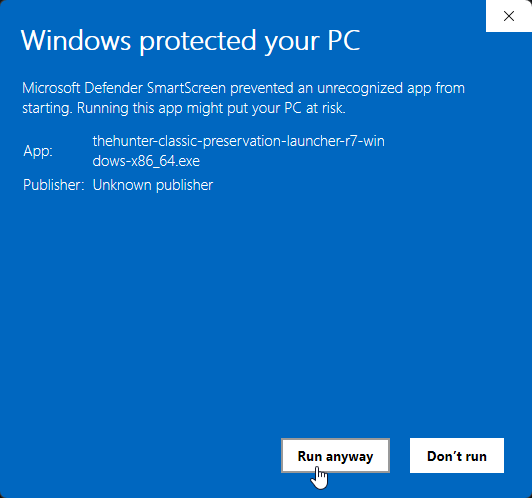
Windows shows an extra warning because this early community build has not been code-signed yet. These are the exact screens you should expect.
Choose Download for Windows above, then open the downloaded r40 Windows x86_64 installer.
If an older Preservation Launcher is already installed, close the launcher and game before opening this installer. Setup securely removes the registered earlier launcher before it installs this version. Your launcher state is retained, and setup never removes or modifies the Steam game.
If Microsoft Defender SmartScreen says it protected your PC, confirm that you downloaded the file from this page and select More info.
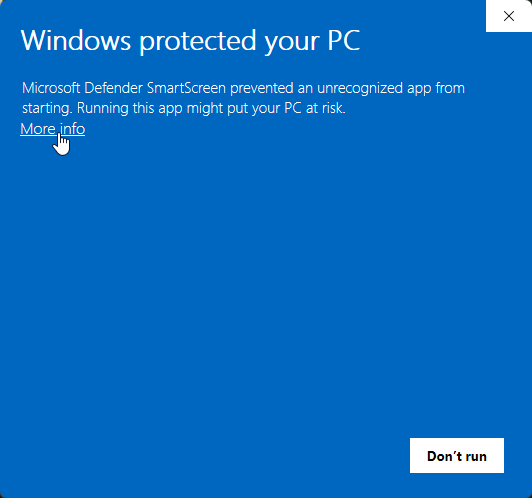
Windows will show the installer name and Unknown publisher. Check that the name begins with thehunter-classic-preservation-launcher-r40, then select Run anyway.
The example below was captured on r7. Your current installer filename should say r40—verify that name before continuing.
Select Yes when User Account Control appears. Administrator access is needed to install the launcher and to create temporary, session-scoped routing when you play.
Finish setup, open theHunter Classic Preservation, sign in, and start the game from the recovered launcher website. No manual certificate import is required.
SmartScreen is reacting to publisher reputation, not reporting that it found malware.
Windows cannot attach a verified publisher identity to the file, so a new download with little reputation is placed behind an extra confirmation screen.
The stock game was built to contact the original service. A normal webpage cannot safely supply the local process routing and launch context that the unmodified game expects.